Posts

Sending beautiful e-mails with MaxBulk Mailer

Image
Welcome to the world of emailing. When launching MaxBulk Mailer you have seen that all you get is a blank document created automatically for you by the application, the place where your message is supposed to be composed. I guess that at this very early stage you may feel a bit lost or overcome, especially when it comes to filling up that blank document and creating an e-mail marketing message for the very fist time. In this short tutorial I will try to explain, in layman terms, how to pass this stage successfully and how to send beautiful e-mails, like the one below, with MaxBulk Mailer. With MaxBulk Mailer, you can actually send the same kind of messages you already receive from your favorite online shops and services. You can indeed deliver beautiful flyers or send really ugly stuff, you are the designer, you are in charge, MaxBulk Mailer doesn't care, it will sent it anyway!  See more at: https://www.maxprog.com/site/blog/post.php?id=476

How to take advantage of Budgets in iCash

One great feature of iCash is the ability to create budgets. A budget is basically a kind of projection of how much money you will spend or earn during a period of time in the future. I believe it is highly probable you already have created budgets in some way or another. Indeed, anytime you figure out how much money you will have left at the end of the month after paying your bills, you are creating a budget. You use budgets to estimate future income and expenses, and create "what if?" scenarios. As time goes by, you may create reports to compare actual incomes and expenses with your budget and find deviations. Typically a budget is created for a specified period of time. At the end of that period you can then compare your actual expenses and earnings with your predicted budget numbers. This can give you a good measure of the health of your economy. iCash budgeting is quite straightforward since you can simply take advantage of the data you have already provided as a s...
Image
Adding transactions to iCash is certainly something you will do very often. It is a borring and repetitive task but, are you sure you are using the software to its full potential? iCash lets you add transactions in many ways but did you know iCash also assists you in order to get it done faster and better? This article shows you how to optimize data input by using the iCash built-in functions, enjoy! https://www.maxprog.com/site/blog/post.php?id=524&about=iCash&topic=Adding_new_transactions_-_Tips_and_tricks
Image
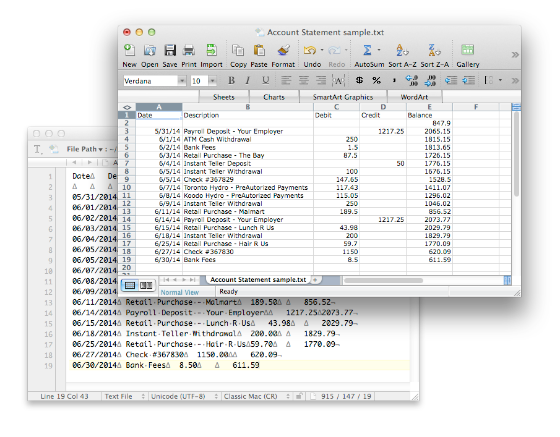
iCash  offers the possibility to import transactions from bank statement files directly into your personal finance. This is a great time-saving feature since you no longer have to type what you can already download from your online bank account. You just need to connect to your Bank, download the statement or the transactions as a text file and then import that file to iCash. The magic is made thru a special window that includes a rule editor and a live preview. All you have to do is to select the  Bank Account  (the statement is of),  default Income and Expense target accounts  and finally create some rules. The importation system processes the Account Statement file applying the rules you have defined to all the transactions. If a rule validates a transaction, the data provided in that rule will be used. If no rules can be applied to a transaction default target accounts will be used. You can preview the result, how the transactions will be added to your acc...
Image
Maxprog on Manhattan movie - This is an HD promotion movie to celebrate our 20 years as programmers.

iCash 7.5.9 release

Image
iCash is an easy-to-use, full featured and multi-purpose Personal Finance Software for macOS and MS Windows intended to help you control all kinds of money issues. It can serve several small accounting needs for either private users, or clubs, associations, self-employed, small businesses or simply to be used at home, making keeping track of incomes, expenses and Banks transactions a snap. With a few clicks you can begin creating accounts and making transactions in minutes. iCash is available in   German ,  French ,  Spanish ,  Italian ,  Swedish ,  Russian ,  Chinese ,  Japanese ,  Korean ,  Dutch  and  Portuguese . 

MLM - The MaxBulk Mailer Mailing List Manager

Image
MaxBulk Mailer is a bulk email software and email marketing tool. It comes with MLM, the MaxBulk Mailer Mailing List manager. MLM is a double opt-in list subscription manager and a message opening/click-through tracking PHP script you can install on your web site and start using in minutes. MLM supports a full set of commands you can use either directly in your web browser or with MaxBulk Mailer. In addition a web interface allows you to log into MLM from your Desktop Computer, your iPad and your iPhone. More info: http://www.maxprog.com/site/scripts/list_manager/index.php MaxBulk Mailer Statistics using MLM

eMail Extractor v3.6.8 release

New eMail Extractor v3.6.8 has been released today. eMail extractor is a very powerful and reliable tool to extract e-mail addresses from all kind of text sources like your local files, plain text drops and the clipboard. eMail Extractor can extract e-mail addresses from plain text (.txt) files, Adobe PDF (.pdf) files, MS Word (.doc and .docx) documents, MS Excel (.xls and .xlsx) sheets, HTML (.html, .htm, .php, ...) and RTF files. eMail extractor is very fast, easy to use and multithread. It retrieves absolutely all valid e-mail addresses and generates an output file with only good and well formatted e-mail addresses without duplicates. More information here:  http://extractor.maxprog.com

MaxBulk Mailer v8.5.5 release

New MaxBulk Mailer v8.5.5 has been released today. This is a free update for all v8 users with an update plan. MaxBulk Mailer is a bulk mailer software and an e-mailmerge tool for Macintosh and Windows that allows anyone to send out customized offers, press releases, price lists or any kind of text or HTML message to a list of subscribers, friends or customers. More information here: http://maxbulkmailer.maxprog.com 

Sending beautiful e-mails with MaxBulk Mailer

Image
With MaxBulk Mailer , you can actually send the same kind of messages you already receive from your favorite online shops and services. You can indeed deliver beautiful flyers or send really ugly stuff, you are the designer, you are in charge, MaxBulk Mailer doesn't care, it will sent it anyway! MaxBulk Mailer is primarilly a bulk e-mailer, its goal is to deliver your message to your subscribers as fast and efficiently as possible. Here 'efficiently' means that MaxBulk Mailer will do everything to place your message on every recipient inbox folder, with all tags (if any) properly processed, all headers properly set and all tracking code properly inserted (if click-through tracking is activated). It will also try to handle errors, recover from connection issues and finish the delivery in a timely maner avoiding overloading the mail server. I am the developer of  MaxBulk Mailer and I wrote a small article on this topic, it is available here .  MaxBulk Mailer is a we...

Como publicar un boletín electrónico

Habrá leído en numerosas ocasiones que resulta más barato convencer a un cliente ya existente de que compre sus productos que captar nuevos clientes. Estudios recientes demuestran que es hasta seis veces más costoso atraer a nuevos clientes que conservar los que ya tiene. También sabrá que la forma más barata de mantener su clientela es a través del marketing por e-mail. Si el marketing por e-mail está teniendo tanto éxito es por su alta efectividad, rapidez y bajo coste. Si se dispone a introducir y vender un nuevo producto o servicio, lo mejor que puede hacer es contactar por e-mail con los clientes que puedan estar interesados. Si puede dar a conocer su producto o servicio directamente a los clientes interesados en los mismos, su negocio tendrá más posibilidades de éxito. No se pierda este documento: Como publicar un boletín electrónico o Cómo entregar sus e-mails comerciales

Pubblicare una Newsletter

Quante volte hai letto che è meno dispendioso ricevere un ordine da un cliente già acquisito piuttosto che da un nuovo cliente? Le ultime statistiche dimostrano che per acquisire un nuovo cliente si spende sei volte di più che non mantenere un cliente di vecchia data. Avrai anche letto che il modo più economico per vendere ai clienti esistenti è quello di contattarli tramite messaggi di posta elettronica mirati. L'Email Marketing si è affermata a livello mondiale grazie alla sua elevata efficacia, alla sua velocità ed ai suoi costi contenuti. Se vuoi proporre e vendere il tuo prodotto o servizio, il metodo migliore è quello di ricorrere alla posta elettronica per contattare il tuo cliente selezionato. La mail mirata è senza dubbio molto efficace. Se riesci a presentare il tuo prodotto o servizio tramite messaggi diretti ai clienti interessati, avrai dato al tuo business un'opportunità di successo in più. Come creare la tua newsletter

Comment démarrer votre propre bulletin d'information

Vous avez lu à de nombreuses reprises qu'il est moins cher de convaincre un client existant d'effectuer un achat, que de persuader un nouveau client d'acquérir un article. Les chiffres les plus récents suggèrent qu'il est certainement aussi coûteux d'acquérir un nouveau client que de maintenir un client déjà existant. Vous avez découvert également que la manière la moins coûteuse de promouvoir un produit auprès d'une clientèle déjà existante est d'envoyer des e-mails ciblés. Grâce à son efficacité, sa vitesse et son coût peu élevé, le marketing par e-mails s'est propagé dans le monde entier. Si vous souhaitez introduire et commercialiser votre produit ou service, la meilleure façon de le faire est d'utiliser le courrier électronique pour contacter votre clientèle ciblée. L'e-mail ciblé est sans aucun doute très efficace. Vos chances de réussite seront fortement accrues, si vous avez la possibilité de promouvoir votre produit ou service, par le ...

Einen Newsletter herausgeben

Sie haben sicher schon oft gelesen, dass es weniger kostet, einen existierenden Kunden zu einem Einkauf anzuregen, als einen neuen Kunden für einen Einkauf zu gewinnen. Die neuesten Zahlen besagen, dass es sechsmal so kostspielig ist, einen neuen Kunden zu gewinnen als einen Kunden zu halten. Sicher haben Sie auch gelesen, dass die kostengünstigste Art, vorhandene Kunden zu umwerben, eine zielgerichtete E-Mail ist. E-Mail-Marketing verbreitet sich aufgrund hoher Wirksamkeit, Geschwindigkeit und niedriger Kosten in der gesamten Welt. Wenn Sie Ihr Produkt oder Ihren Service vorstellen und verkaufen möchten, nutzen Sie am besten E-Mails, um mit Ihren anvisierten Kunden in Verbindung zu treten. Eine zielgerichtete E-Mail ist zweifellos sehr wirkungsvoll. Wenn Sie Ihr Produkt oder Ihren Service mittels E-Mail direkt den Kunden vorstellen können, die daran interessiert sind, bietet das Ihrem Geschäft eine größere Erfolgschance. Beginnen Sie mit Ihrem Newsletter

How to create and publish your first newsletter

You have read over and over that it is less expensive to get an existing customer to make a purchase than to get a new customer to make a purchase. The most recent figures suggest that it is six times as expensive to acquire a new customer than it is to retain a customer. You have also read that the least expensive way to market to existing customers is via targeted e-mail. Email Marketing is spreading around the whole world because of its high effectiveness, speed and low cost. If you want to introduce and sell your product or service, the best way is to use e-mail to contact your targeted customer. Targeted e-mail is no doubt very effective. If you can introduce your product or service through email directly to the customers who are interested in them, this will bring your business a better chance of success. Read this interesting tutorial here: How to create and publish your first newsletter

iCash 3.2

Maxprog is proud to present a new release of iCash, new version 3.2, available now in English, German, French, Swedish, Italian, Dutch, Spanish and Portuguese on Maxprog website with a lot of new features and improvements. iCash is an easy-to-use, full featured and multi-purpose software intended to control your personal finances, keeping track of incomes, expenses, credits, debts and Banks transactions for you. As simple as creating the accounts you need and move money between them! You don't even need to know about accounting or even care about it! iCash can serve several small accounting needs for either private users, or clubs, associations, self-employed, small businesses or simply to be used at home, making keeping track of incomes, expenses and Banks transactions a snap. With a few clicks you can begin creating accounts and making transactions in minutes. What's new: - Multiple currencies support. - Scheduled and recurring transactions support. - Project supp...

MaxBulk Mailer 4.4

Maxprog is proud to present a new release of Maxbulk Mailer, our e-mail merge tool for Macintosh and Windows, new version 4.4, available now on Maxprog website with several interesting improvements, new features and fixes. MaxBulk Mailer is a is a full featured, fast and easy-to-use bulk mailer and mail-merge tool with Plain text, HTML and styled text support, attachment support, advanced mail-merge functions, conditional messages, ISO-8859 full support, multiple accounts with authentication, recipients management, mySQL/postgreSQL imports, SSL support, unicode UTF-8 support, 32 encoding for virtually any language and hundreds of exclusive features. MaxBulk Mailer is available in English, Japanese, French, German, Spanish and Italian. What's new: - New HTML and styled messages with custom inline pictures support. - Chg User can now choose to import one or all addresses from Mac OS X Address Book. - Chg When sending messages with inline images, only used images are embedde...

iCash v3

Maxprog is proud to present a new release of iCash, new version 3.0, available now in English, German, French, Swedish, Italian, Dutch, Spanish and Portuguese on Maxprog website with a lot of new features and improvements Maxprog's iCash is a $30 personal finance and money manager software designed to track incomes, expenses, credits, debts and banks transactions. It offers unlimited categories, multiple accounts creation, multiple currencies, a SQL backend engine, password protection, export/import routines, search functions, and drag & drop support. [Mac OS X , Mac OS 9, Windows] (Available in English, German, French, Swedish, Italian, Dutch, Spanish and Portuguese) iCash is a Personal Finance software, a tool intended to control your money, keeping track of incomes, expenses, credits, debts and Banks transactions for you. As simple as creating the accounts you need and move money between them! You don't even need to know about accounting or even care about it! iCas...

iCash and money lending, add the transactions properly and keep control over it!

Image
So you have lent an amount of money to a friend and you are interested in reflecting the exact transactions in iCash . It is easy but it requires several steps you need to understand well. You have to create your lending account first, as a portfolio account as it is an investment. Once done you have to create a starting transaction from your checking account to that lending account. That transaction represents the money transfer between you and the borrower: For this example let say the borrower will give you the money back in 12 months with an annual interest of 5%. First payment will be enterred that way: where 'Interests' is an account of type 'Incomes' you have to create as well so you can gather the interests. Why 2 transactions? Simple, just to keep track of incomes. You could simply create a single transaction from the borrower to your Bank account but if you do that you will end with a negative Borrower account and no trace of incomes. Note that you...

Avoiding having your legitimate e-mails being flagged as SPAM

If your messages look like regular private e-mails and you use tags to make them different and customized with recipient data, you will get much better results. You can also use 'Bonded Sender' https://www.bondedsender.com or 'Habeas' http://www.habeas.com so your messages will be recognized as legitimate. Furthermore you can run your email through some of the spam filters available online, or install some end-user antispam applications on your own computer, and send an email to yourself before attempting to email end users. There are some services you can use to test the spam quotient of your e-zines and e-mail offers before sending them out. - SiteSell SpamCheck Report tests your message at no charge using SpamAssassin and sends you a report. Send your test e-mails to mailto:sales-spamcheck@sitesell.net Be careful, however, that you put the word TEST as the first word in the subject -- and make sure it is capitalized. Otherwise, the system will delete the mail...