Posts

Showing posts with the label Household management
Image
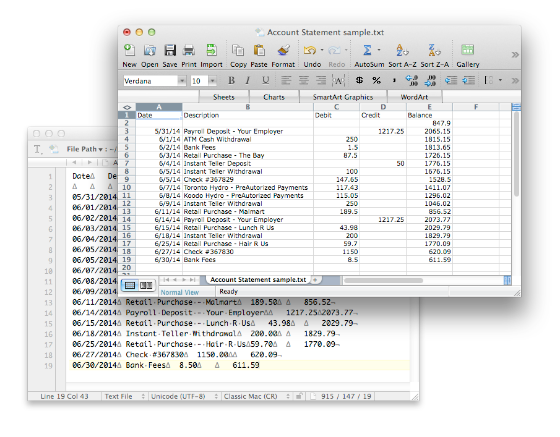
iCash  offers the possibility to import transactions from bank statement files directly into your personal finance. This is a great time-saving feature since you no longer have to type what you can already download from your online bank account. You just need to connect to your Bank, download the statement or the transactions as a text file and then import that file to iCash. The magic is made thru a special window that includes a rule editor and a live preview. All you have to do is to select the  Bank Account  (the statement is of),  default Income and Expense target accounts  and finally create some rules. The importation system processes the Account Statement file applying the rules you have defined to all the transactions. If a rule validates a transaction, the data provided in that rule will be used. If no rules can be applied to a transaction default target accounts will be used. You can preview the result, how the transactions will be added to your acc...
iCash 7.5.9 release

Image
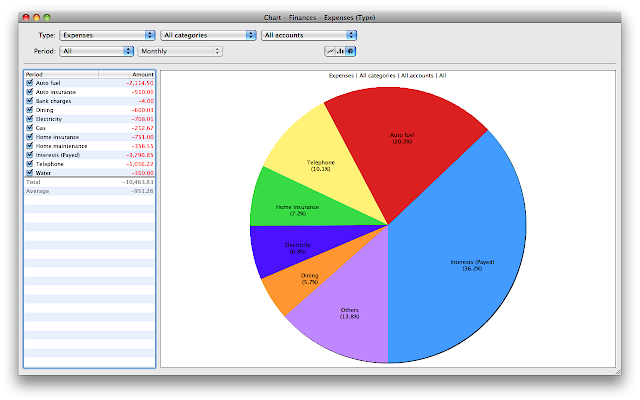
iCash is an easy-to-use, full featured and multi-purpose Personal Finance Software for macOS and MS Windows intended to help you control all kinds of money issues. It can serve several small accounting needs for either private users, or clubs, associations, self-employed, small businesses or simply to be used at home, making keeping track of incomes, expenses and Banks transactions a snap. With a few clicks you can begin creating accounts and making transactions in minutes. iCash is available in   German ,  French ,  Spanish ,  Italian ,  Swedish ,  Russian ,  Chinese ,  Japanese ,  Korean ,  Dutch  and  Portuguese . 

iCash 3.2

Maxprog is proud to present a new release of iCash, new version 3.2, available now in English, German, French, Swedish, Italian, Dutch, Spanish and Portuguese on Maxprog website with a lot of new features and improvements. iCash is an easy-to-use, full featured and multi-purpose software intended to control your personal finances, keeping track of incomes, expenses, credits, debts and Banks transactions for you. As simple as creating the accounts you need and move money between them! You don't even need to know about accounting or even care about it! iCash can serve several small accounting needs for either private users, or clubs, associations, self-employed, small businesses or simply to be used at home, making keeping track of incomes, expenses and Banks transactions a snap. With a few clicks you can begin creating accounts and making transactions in minutes. What's new: - Multiple currencies support. - Scheduled and recurring transactions support. - Project supp...

iCash v3

Maxprog is proud to present a new release of iCash, new version 3.0, available now in English, German, French, Swedish, Italian, Dutch, Spanish and Portuguese on Maxprog website with a lot of new features and improvements Maxprog's iCash is a $30 personal finance and money manager software designed to track incomes, expenses, credits, debts and banks transactions. It offers unlimited categories, multiple accounts creation, multiple currencies, a SQL backend engine, password protection, export/import routines, search functions, and drag & drop support. [Mac OS X , Mac OS 9, Windows] (Available in English, German, French, Swedish, Italian, Dutch, Spanish and Portuguese) iCash is a Personal Finance software, a tool intended to control your money, keeping track of incomes, expenses, credits, debts and Banks transactions for you. As simple as creating the accounts you need and move money between them! You don't even need to know about accounting or even care about it! iCas...

iCash and money lending, add the transactions properly and keep control over it!

Image
So you have lent an amount of money to a friend and you are interested in reflecting the exact transactions in iCash . It is easy but it requires several steps you need to understand well. You have to create your lending account first, as a portfolio account as it is an investment. Once done you have to create a starting transaction from your checking account to that lending account. That transaction represents the money transfer between you and the borrower: For this example let say the borrower will give you the money back in 12 months with an annual interest of 5%. First payment will be enterred that way: where 'Interests' is an account of type 'Incomes' you have to create as well so you can gather the interests. Why 2 transactions? Simple, just to keep track of incomes. You could simply create a single transaction from the borrower to your Bank account but if you do that you will end with a negative Borrower account and no trace of incomes. Note that you...